Microsoft Copilot for M365 Data Handling Security Review
The AI tool exposes existing overpermissioning problems faster than humans ever could.

Microsoft's Copilot for M365 isn't a chatbot bolted onto a productivity suite. It's a retrieval engine that pulls live data from a company's entire Microsoft 365 estate, and that architecture is exactly why it needs its own governance conversation, separate from whatever AI policy already sits on the shelf.
Start with the name change, since it trips people up. Microsoft 365 Copilot is now just "Microsoft Copilot." Microsoft 365 Copilot Chat is now "Microsoft Copilot Chat." The rebrand did not change the underlying product. Same product, same risk profile, new label.
What actually matters is how the thing works under the hood. Copilot runs on retrieval-augmented generation (RAG), which means it isn't just an LLM answering from what it was trained on. It's an orchestration layer that coordinates three things at once: the language model itself, Microsoft Graph, and the M365 apps a person already uses, Word, Excel, and an email client. Microsoft Graph is the part doing the heavy lifting. It's the access layer that reaches into emails, OneDrive files, SharePoint sites, Teams chats, calendars, meeting notes, and contact lists, then pulls whatever's relevant to a prompt.
A user doesn't point Copilot at a file or a folder, and this is what separates it from a standalone AI tool. A user doesn't point it at a file or a folder. There's no "upload this document" step. Ask Copilot to summarize last quarter's sales trends, and it goes and finds the spreadsheets, the emails, the Teams threads, all on its own, based on natural language alone. Traditional AI tools only work with what a person hands them directly. Copilot works with what the tenant already has, and it decides what's relevant.
By design, Copilot only surfaces what the querying user is already authorized to see under Microsoft Graph's permission model. It doesn't bypass access controls. Microsoft frames this as Zero Trust in action: strong identity checks, least-privilege access, continuous evaluation, all per Microsoft's documentation. That's the promise. But notice the tension baked into it already: the same retrieval process that makes Copilot genuinely useful, reaching across the entire data estate without a human having to navigate it, is also the surface an attacker or a permission misconfiguration can exploit. Usefulness and exposure run on the same rail here. That tension is what the rest of this piece works through.
Microsoft's data protection commitments and where their boundaries sit
Prompts and responses fall under the Microsoft Products and Services Data Protection Addendum (DPA) and the Product Terms, with Microsoft acting as data processor, under binding contractual commitments rather than marketing claims. Prompts and responses fall under the Microsoft Products and Services Data Protection Addendum (DPA) and the Product Terms, with Microsoft acting as data processor. Data pulled from Graph is covered under the no-training commitment specifically, rather than sitting in its own separately listed DPA category, but the protection is there.
Encryption at rest and in transit, tenant data isolation, and a hard no on using customer data to train Microsoft's foundation models are the commitments worth knowing. Sensitivity labels, retention policies, audit logging, and admin settings all get respected by the system, at least as documented. On the compliance side, Copilot carries GDPR alignment, ISO 27001 certification, and HIPAA support for properly configured deployments.
Data residency is where a few carve-outs affect which jurisdictions data can legally be processed in.
The EU Data Boundary initiative keeps EU customer data inside the EU for Copilot processing. Good news, until you hit the exceptions. Web search queries aren't covered by the DPA or by any Business Associate Agreement, so HIPAA protections and the EU Data Boundary simply don't apply to them. Copilot Chat's LLM calls route according to data center availability, and processing location can vary by conditions. Tenant configuration and sign-up region affect which data boundary protections apply, and not all organizations qualify for EU Data Boundary coverage. And Swiss subsidiaries of multinational groups don't get residency decided by their own local M365 configuration. It's determined by the parent group's tenant architecture instead, which catches a lot of compliance teams off guard.
Subprocessor models used inside Copilot experiences may carry different data boundary and processing commitments than Microsoft's core services. Separate documentation governs how Anthropic and OpenAI operate as subprocessors, and tenants running regulated workloads should read it closely.
None of this is a knock on Microsoft's commitments. They're substantive, and they cover what Microsoft does with data once it has it. What they don't cover is how data moves inside a company's own tenant, who can see what, and what happens when permissions were already broken before Copilot showed up. That's where the real risk lives, and it's the subject of the next section.
Why overpermissioning is the central risk Copilot exposes rather than creates
Copilot doesn't invent oversharing. It finds oversharing that's already sitting there and makes it instantly queryable.
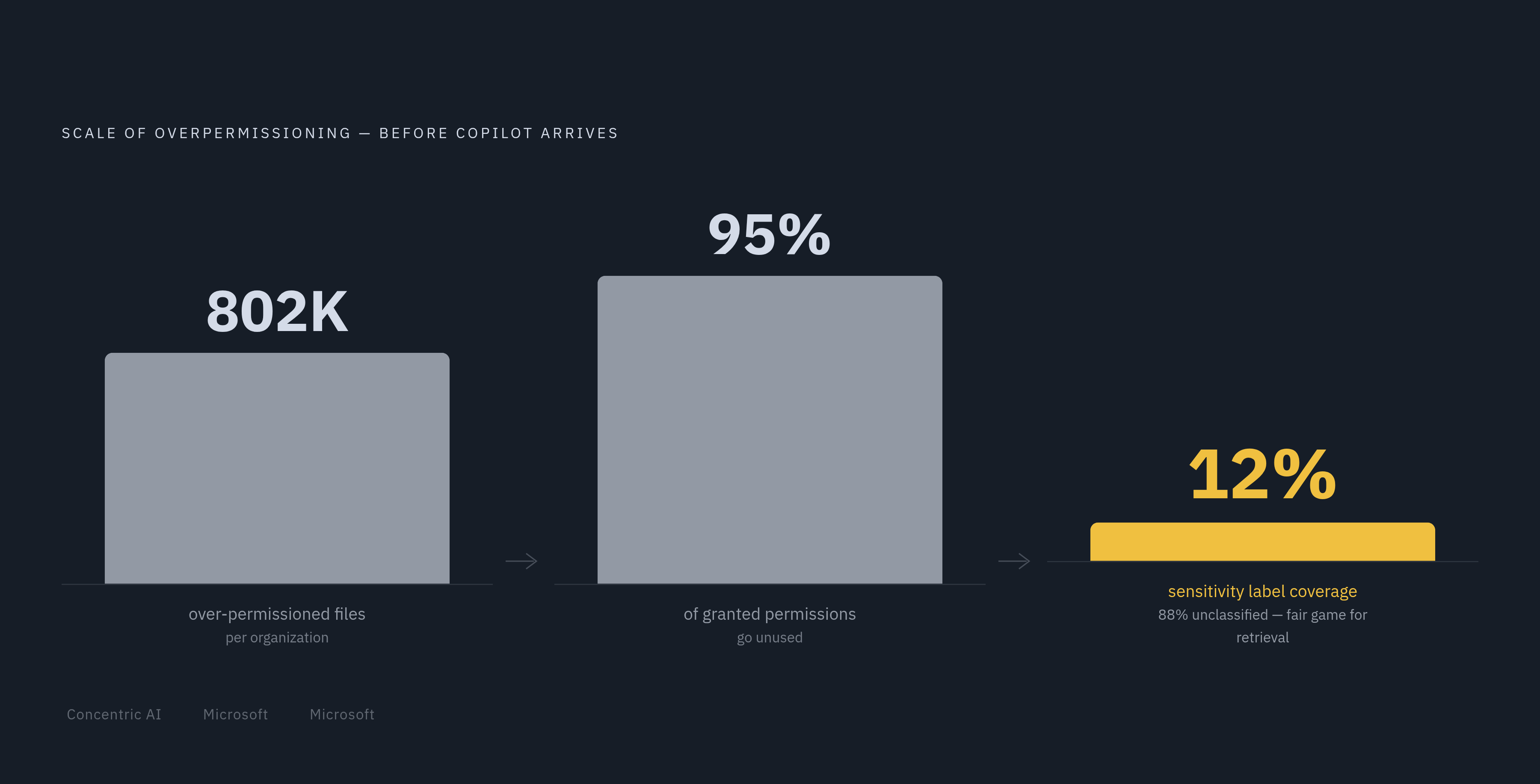
Concentric AI's Data Risk Report found an average of 802,000 over-permissioned files per organization. Of data shared organization-wide, 57% contained privileged information. Those aren't Copilot's numbers. Those are the baseline conditions Copilot walks into on day one of deployment.
Microsoft's own data backs this up from a different angle: 95% of granted permissions across a typical tenant go unused, and 90% of identities only touch about 5% of what they're technically entitled to access. So there's this huge reservoir of dormant, over-broad access sitting in most environments. A human employee might never stumble onto a stray folder buried three levels deep in someone else's OneDrive. Copilot, working off a single natural-language query, can surface it in seconds. It's not smarter than a person poking around manually, it's just faster, and it doesn't get tired of checking.
Sensitivity labels were supposed to be the safety net here, but the net has holes. Concentric AI assessed over 500 tenants ahead of Copilot rollouts and found average label coverage is just 12%. That means the overwhelming majority of content in most organizations carries no classification Copilot can even honor, because there's nothing to honor.
Container-level labeling makes this worse in a way that trips up a lot of admins. Slap a "Confidential" label on a SharePoint site, and that label does not automatically pass down to the files inside it. Copilot treats any unlabeled item as fair game for retrieval, site label or no site label.
What does this look like in practice? A few patterns appear repeatedly in how organizations deploy and govern Copilot:
- Sites configured as "Everyone except external users" quietly holding salary data, M&A documents, or customer PII
- Folder permissions inherited down a directory tree, cascading access into subfolders nobody meant to expose
- Public Teams channels where someone shared something sensitive assuming the channel had limited visibility
- Legacy sharing links from a project that wrapped up years ago, still live and still granting access
- Permission inheritance left broken after external collaborators got temporary access that was never properly revoked
And it doesn't stop at retrieval. Copilot's own outputs don't consistently inherit the security labels of the source files they're built from. So a document Copilot generates by pulling from a labeled, confidential source can come out the other side unclassified, and then get shared without anyone realizing what's actually in it. Concentric AI puts the figure at 16% of business-critical data ending up overshared this way.
The scale here is the part that should give any security team pause. Around 70% of Fortune 500 companies are deploying M365 Copilot. In just the first half of 2025, Concentric AI found Copilot accessing nearly 3 million sensitive records per organization. That's not a hypothetical risk anymore. That's a permission problem that existed quietly for years, suddenly running at production speed.
EchoLeak (CVE-2025-32711) and what indirect prompt injection reveals about RAG architecture risk
In June 2025, researchers at Aim Security disclosed EchoLeak, tracked as CVE-2025-32711, with a CVSS score of 9.3. It's a zero-click vulnerability that required no user interaction whatsoever, and it lived inside Microsoft 365 Copilot's own architecture.
The core idea is that untrusted, external input, something as ordinary as an email landing in someone's inbox, can manipulate the model into reaching outside its intended scope and pulling confidential data it was never supposed to touch. No click, no download, no attachment opened. The content just had to be there for Copilot to ingest.
The exploit chain, per Aim Security's disclosure, strung together several separate weaknesses. It got past Microsoft's XPIA classifier (the system built specifically to catch cross-prompt injection attempts). It slipped by link redaction using reference-style Markdown formatting. It abused auto-fetched images to move data out. And it exploited a Teams proxy that the content security policy happened to allow. Chain all four together, and an attacker gets privilege escalation across the LLM's trust boundary, without the victim doing anything at all.
Why exactly does this happen when so many traditional defenses exist to catch exactly this kind of thing? Because the exploit runs entirely in natural language. Antivirus software scans files. Firewalls watch network traffic. Static scanners look at file structure. None of them read natural-language sentences for malicious intent, and that's precisely the layer EchoLeak operated in. The attack surface is language itself, not code.
What could an attacker reach through this? Anything already inside the victim's Copilot access scope. Chat logs, OneDrive files, SharePoint content, Teams messages, whatever preloaded organizational data Copilot had permission to touch.
Microsoft patched the backend in June 2025, folded into that month's Patch Tuesday cycle. No customer action was required beyond keeping systems current, and there's no confirmed report of in-the-wild exploitation. So the immediate fire got put out.
But the deeper significance doesn't go away with the patch. EchoLeak represents a documented case of prompt injection being weaponized for actual data exfiltration inside a production AI system, not a lab demo, not a proof of concept published for shock value. This wasn't the first sign of trouble either. In January 2024, a researcher going by "wunderwuzzi" disclosed a related technique called ASCII Smuggling, which used invisible Unicode tag characters to encode stolen data inside generated hyperlinks. Microsoft's Security Response Center got that report in January 2024 and patched it by late July or August of that year.
Two separate disclosures, over a year apart, both exploiting the same underlying reality: a RAG-based assistant retrieves and processes content from wherever it's told to look, and there's no clean way to guarantee that content is trustworthy. Patching individual CVEs closes specific doors. It doesn't change the fact that indirect prompt injection is a structural property of how these systems retrieve and act on external content, not a bug that gets fully swept away.
Agent Mode and Copilot Studio extensibility as a compounding governance surface
Copilot stopped being just an assistant a while back. Agent Mode lets it draft emails, schedule meetings, query data sources, and trigger actions across M365 without a person walking through each step manually. That's a meaningful shift in what's being governed.
Microsoft's October 2025 product update introduced Agent Mode in Word and Agent Mode in Excel, alongside new agents and updates to the Researcher tool. The pace of that rollout says something on its own: agentic surface area inside M365 is expanding fast, month over month.
Copilot Studio pushes this further by letting enterprise teams build their own custom agents that act autonomously. Every one of those custom agents inherits the same over-permissioned, under-labeled data estate that the rest of the tenant already has. Build a new agent, and it doesn't start from a clean slate. It starts from whatever mess (or order) already exists in Graph.
Extensibility multiplies exposure in a few specific ways. Copilot connectors and Copilot Studio agents stretch Graph's reach out into third-party business systems, well beyond the M365 stack itself. Each custom agent also carries its own privacy statement and terms of use, separate from Microsoft's baseline commitments, which means enterprises have to actually go review each one rather than assuming blanket coverage. And agents running with real identities and real permissions across live workflows create blind spots that a static, point-in-time permission review simply won't catch, because the agent's behavior changes as the workflow changes.
In December 2025, researchers at Tenable demonstrated in a real, non-theoretical case how a travel-booking agent built on Copilot Studio could be manipulated through prompt injection into leaking customer credit card data. In December 2025, researchers at Tenable demonstrated how a travel-booking agent built on Copilot Studio could be manipulated through prompt injection into leaking customer credit card data. One agent, one narrow use case, and a real payment data leak.
The industry response has been to formalize the threat model. OWASP published a dedicated Top 10 for agentic AI systems in 2026, covering things like unsafe tool invocation, uncontrolled external dependencies, and privilege escalation across LLM trust boundaries, the same category of failure EchoLeak demonstrated a year earlier. Microsoft answered with its own Copilot Studio OWASP mapping, published March 30, 2026, and followed on May 1, 2026 with Microsoft Agent 365, which adds agent identity management through Entra Agent ID and Defender-based threat signals. Some of the runtime threat protection features were still in preview at general availability. It's priced at $15 per user, per month, stacked on top of existing M365 licensing.
Governance can no longer treat data access and agent action as separate problems. What an agent reads and what an agent does have become the same governance question.
Shadow AI as the perimeter Copilot governance tends to miss
Shadow AI is what happens when employees reach for AI tools outside whatever's officially sanctioned, tools that operate completely outside the view of IT, InfoSec, or Legal. It's not a Copilot problem specifically. It's a blind spot that Copilot governance, focused as it is on the M365 boundary, tends to walk right past.
IBM's 2025 breach report, cited in research from witness.ai, found that 97% of organizations hit by an AI-related security incident had no proper AI access controls in place. Shadow AI contributed to 20% of those breaches, tacking on an average of $670,000 to the cost of each incident. That's not a rounding error in a security budget.
Tightening Copilot governance can actually push shadow AI use up, not down. Block an employee from a Copilot capability they need for their job, and they don't stop needing it. They just go find a consumer AI tool that offers it, one with zero enterprise data protection, zero audit trail, and zero visibility for the security team. The restriction solves the problem of sanctioned tools while quietly making unsanctioned tool use worse.
The US House of Representatives banned staff from using Copilot outright over data security concerns. That's a real, documented case of an organization drawing a hard line on official AI access, while offering no guarantee that shadow use didn't just move somewhere less visible. Separately, 67% of enterprise security teams report active concern about AI tools exposing sensitive information.
Sensitivity labels, DLP policies, and conditional access all operate inside the M365 boundary. None of them have any reach into a browser tab running a consumer chatbot. Governance built entirely around Copilot leaves that perimeter wide open.
What Microsoft's native controls cover and where they leave gaps
Microsoft has been building out defenses against most of what's described above, and Ignite 2025 (November 2025) was where a lot of it landed at once.
Purview Data Loss Prevention for Microsoft Copilot blocks sensitive data from being processed by Copilot or sent out through web queries. SharePoint Advanced Management (SAM) brought a batch of tools together: content management assessment, per-user permission reporting, an agent insight report, catalog management, and the ability to delegate Restricted Access Control and Restricted Content Discovery down to site admins instead of centralizing it. Purview Data Security Posture Management added item-level data risk assessment and remediation. Alongside those, Microsoft rolled out a SharePoint Admin Agent and a Baseline Security Mode, and folded Purview's value proposition directly into the Microsoft 365 admin center so it's not a separate tool admins have to remember to check.
On the AI-specific side, XPIA classifiers are designed to detect and counter cross-prompt injection attempts within Copilot, though Microsoft's own documentation notes these classifiers aren't available across every Copilot scenario. Entra Agent ID, introduced with Agent 365's general availability on May 1, 2026, brings identity management specifically to agents rather than treating them like generic service accounts. The October 2025 update also added new reports and management tools to the admin center, plus team-level views inside the Copilot Dashboard, both aimed at giving admins more visibility than they had a year earlier.
That's a genuinely wide set of tools. But a few gaps persist even with all of it deployed.
Container labels still don't inherit down to items, so a labeled SharePoint site can sit right next to a pile of unlabeled, fully exposed files. XPIA classifiers, again, don't cover every scenario. Web search queries remain outside the DPA, outside HIPAA's Business Associate Agreement, and outside the EU Data Boundary, a gap that exists no matter how well-configured the rest of the tenant is. Subprocessor models from Anthropic still sit outside the EU Data Boundary as of the most recent documentation. And that 12% average sensitivity label coverage figure from earlier doesn't disappear just because new tools got announced. Most organizations are still deploying Copilot on top of a largely unlabeled data estate, and Concentric AI's finding that over 15% of business-critical files are at risk from oversharing, bad permissions, or misclassification reflects years of accumulated sprawl that no native control retroactively fixes on its own.
None of this makes Microsoft's controls weak. It makes them necessary but not sufficient. Permission remediation, labeling, DLP, and conditional access build the floor. They weren't designed to catch an indirect prompt injection buried in an email, and they don't produce a conversational audit trail across a chain of agent actions. That's a different kind of visibility, and it has to come from somewhere else.
A governance framework for enterprises deploying Copilot across the five risk domains
Everything above points to one conclusion: deploying Copilot well means governing five distinct risk domains at once, not just flipping on Microsoft's native controls and calling it done. Those domains are overpermissioning, prompt injection, agent extensibility, shadow AI, and the residency and subprocessor carve-outs buried in Microsoft's own data protection terms.
Start with permissions, because everything else compounds on top of whatever's already broken there. Concentric AI's 802,000 over-permissioned files per organization and Microsoft's own 95%-unused-permissions figure both point to the same fix: audit access before deployment, not after. Sensitivity labeling needs to climb well past that 12% baseline, and it needs to happen at the item level, not just the container level, given that container labels don't inherit down.
Prompt injection can't be treated as a patched-and-done problem. EchoLeak got fixed in June 2025, but the class of vulnerability it represents, untrusted content manipulating model behavior, is structural to how RAG systems work. That means ongoing monitoring for injection patterns, not a one-time remediation checked off a list.
Agent governance has to extend past Microsoft's Agent 365 and Entra Agent ID rollout. Every custom Copilot Studio agent needs its own review, its own permission scope, and its own accounting for the third-party systems it connects to through Graph. The Tenable travel-booking agent case from December 2025 is a preview of what happens when that review doesn't happen.
Shadow AI needs a policy response, not just a blocking response. Restricting Copilot access without giving employees a sanctioned alternative just pushes the same work into tools with zero visibility and zero data protection, exactly the dynamic IBM's 2025 report priced at an extra $670,000 per incident.
And residency terms deserve a real read, not a skim. Web search exclusions, the US-tenant EU Data Boundary gap, Swiss subsidiary architecture, the Anthropic subprocessor carve-out: these all sit in Microsoft's documentation already. Reading them before deployment costs nothing. Discovering them after a compliance audit costs quite a bit more.
Copilot's architecture is powerful because it reaches everywhere a user is authorized to go. That's also exactly why governing it can't stop at the tools Microsoft ships in the box.
Sources
- Data, Privacy, and Security for Microsoft Copilot
- Security and governance innovations for Microsoft 365 Copilot and agents from Ignite 2025 | Microsoft Community Hub
- beyondscale.tech
- microsoft.com
- What’s new in Microsoft 365 Copilot | October 2025 | Microsoft Community Hub
- Enterprise data protection in Microsoft Copilot and Microsoft Copilot Chat
- hackthebox.com
- learn.microsoft.com