Salesforce Einstein AI Data Flow and Isolation Controls
How Salesforce shields CRM data when sending prompts to AI models.
Salesforce Einstein's generative AI features don't talk to language models directly. Every prompt and every response routes through something called the Einstein Trust Layer, a layered set of agreements, security tech, and data controls that is between Salesforce and the model provider. This piece maps what that layer actually does, stage by stage, and where its coverage runs out.
The core problem it exists to solve is simple to state: generative AI needs CRM data to be useful, and useful CRM data has to leave Salesforce's boundary to reach an external model. That's an egress path for regulated data that older security tools were never built to watch. As framed at Enterprise Dreamin' in 2026, the risk is what gets sent to the model, not that a model has bad intent. It's what gets sent to it. Every grounded prompt is a potential channel for PII, PHI, or proprietary records to walk out the door, and the Trust Layer is Salesforce's answer to that. It works in both directions too: there's a prompt journey heading out to the LLM, and a response journey coming back in, with checks running on both legs, not just the outbound one.
How data moves through the Trust Layer, the prompt and response journey in sequence
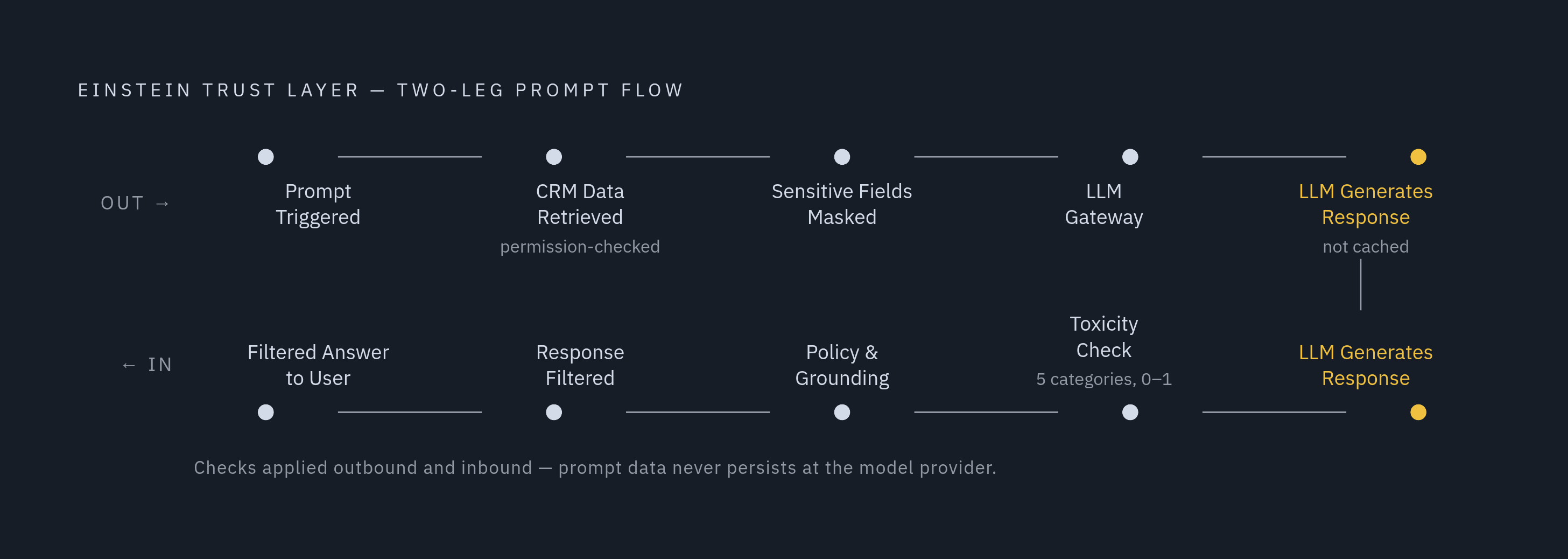
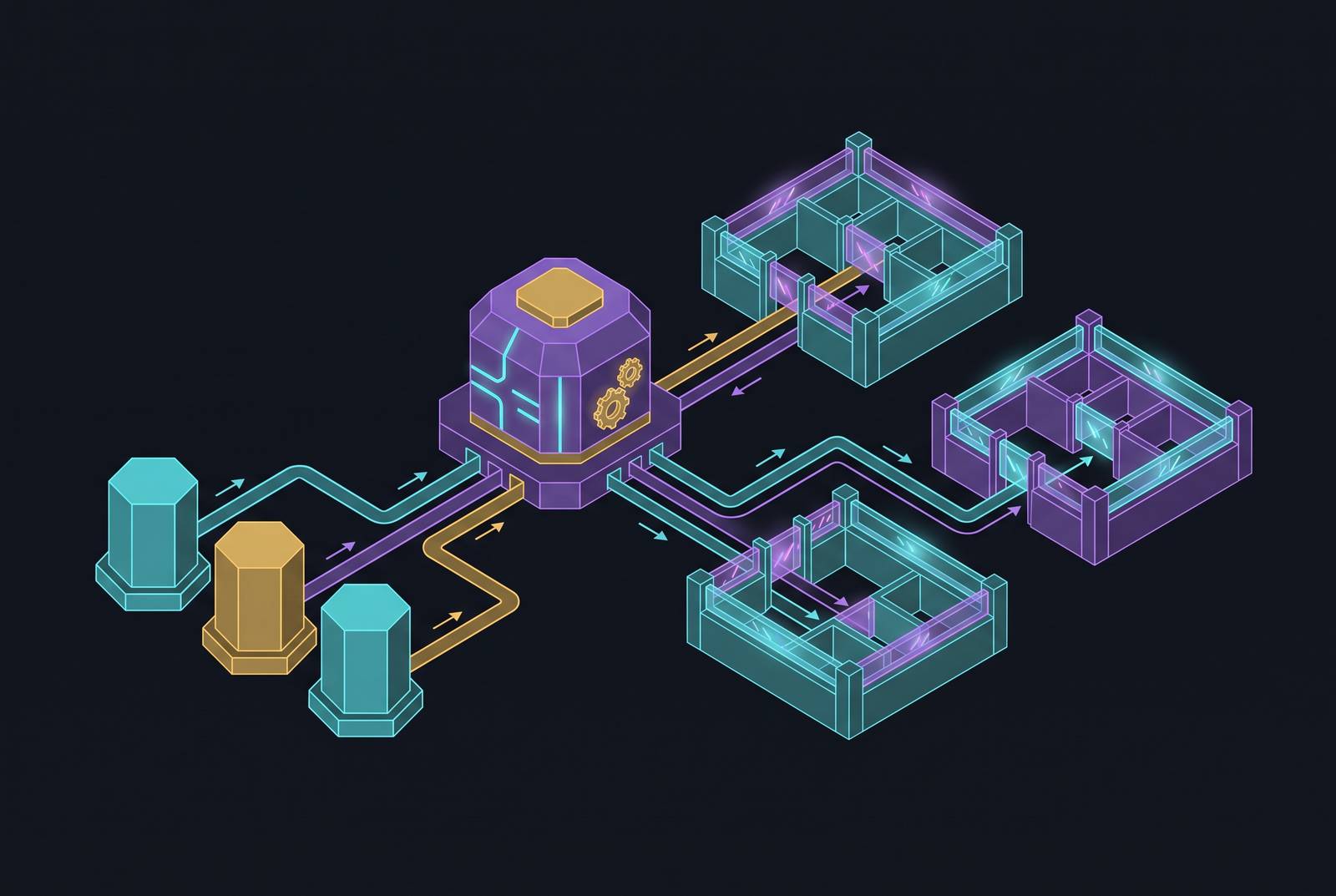
Three pieces make up the architecture: Prompt Journey, LLM Gateway, Response Journey. Each one is a distinct stage with its own job, not just a label on a diagram.
On the way out, CRM data gets retrieved, grounded into the prompt, masked, then pushed through the secure LLM Gateway before it ever touches the model provider. On the way back, the model's output runs through toxicity scoring, policy compliance checks, grounding validation, and response filtering before the application sees it.
Walk it in order: someone triggers a prompt. Salesforce retrieves the relevant data. Sensitive fields get masked. The masked prompt passes through the Gateway to the LLM. The model responds. That response gets checked for toxicity and verified against the original grounding data. Only then does a filtered answer land back in front of the user.
The prompt isn't cached at the model provider. The whole flow is one-way and temporary, by design, not by promise.
Each of those stages has its own dedicated control mechanism, and the rest of this piece goes through them in the order data actually travels.
Secure data retrieval, how the Trust Layer enforces access controls before grounding happens
Grounding means adding CRM context to a prompt so the model's output is actually relevant, pulling from record fields, flows, Apex, Data 360 DMOs, and related lists. It's what turns a generic model into one that knows your account history.
Secure data retrieval is the rule that grounding only pulls data the executing user already has permission to see. Field-level security, sharing rules, role-based access, all of it carries over. And it's dynamic: the permission check happens at the moment the prompt runs, under whoever's logged in right then, not baked in when someone built the prompt template months earlier.
This matters. If a user lacks Field-Level Security access to a field, the AI omits that field from retrieval, not merely from the interface display. The permission check comes before retrieval. Not after. Not as a display filter layered on top.
Why does that distinction matter so much? Because a search or retrieval pipeline that ranks by relevance doesn't automatically know who's allowed to see what. Without sharing-aware retrieval baked into the process, a low-privilege user could end up with grounding content they were never entitled to touch. According to Enterprise Dreamin', most enterprise RAG failures stem from causes other than the model. Missing sharing-aware retrieval causes access-control failures that appear disguised as a search result.
That's the mechanism keeping grounding safe. But what happens when sensitive data makes it into a prompt anyway, even with permissions correctly enforced? That's what masking handles next.
Data masking, what gets redacted before the prompt leaves Salesforce and how it gets restored
Masking finds sensitive data inside a prompt and swaps it for generic placeholders before that prompt ever crosses Salesforce's boundary. Once the response comes back, the Trust Layer un-masks it, restoring the real values for the user who's actually allowed to see them.
Two detection methods do the work. Pattern-based detection catches things with a predictable shape, using regex and context words, think credit card numbers or email formats. ML-based detection catches things without a fixed pattern, like a person's name or a company name, where no regex in the world would reliably catch every variation.
Field-based masking leans on metadata from fields already classified through Shield Platform Encryption or standard data classification, so existing classification work extends naturally into LLM masking rather than starting from scratch. Supported categories include company names, credit card numbers, and email addresses, and per Salesforce's own documentation, that coverage spans most of the regulated identifiers organizations care about.
The benchmark cited at Enterprise Dreamin' 2026 is HIPAA's 18 PHI identifiers plus the common PII and PCI patterns. Getting there requires both detection methods working together. Pattern matching alone misses unstructured data, so the ML side has to carry names, informal references, anything without a clean regex signature.
After Data 360 setup, LLM data masking for certain sensitive data types is on by default, though organizations can review and adjust those defaults to match their own governance and regulatory needs.
Now for the gap that matters most. Data masking for LLMs is currently disabled for agents, meaning Agentforce. It's available and configurable for embedded generative AI features like Einstein Service Replies and Einstein Work Summaries, but not for agentic workflows. That's a strange place for the gap to sit, because agents don't just generate text, they take actions. Updating records, sending emails, triggering flows. Arguably the scenario where masking matters most is exactly the scenario where it doesn't currently apply.
And that gap has teeth elsewhere too. Zero data retention only means something if what gets sent to the model is already scrubbed. If a real identifier ships because masking wasn't active, the retention guarantee doesn't erase the fact that the data already reached the provider. These two controls only work as a pair.
Zero data retention, what the policy covers, how it is enforced, and what it does not touch
Salesforce holds contractual zero data retention agreements with external model providers, including OpenAI and Azure OpenAI. Anything sent to the model gets deleted once a response comes back to Salesforce, and none of it gets used to train the provider's models.
That covers both halves: the prompt text going out and the generated response coming back. Neither is stored outside Salesforce, neither trains the vendor's model. The architecture is designed to align with what the contract promises. Salesforce also states it doesn't currently use customer data to train its own generative AI models, and if that ever changes, customers should expect to see updated product terms governing any such use.
Two wrinkles are easy to miss.
First: data governance settings around Salesforce's own use of customer data are separate from the zero-retention deal with model providers, and they should be verified directly rather than assumed.
Second, and bigger: zero data retention covers what happens at the model provider. It says nothing about the customer's own environment. Logged audit data lands in Data 360 on the customer's side, and how long that data sits there is entirely the customer's call to make and govern.
As Enterprise Dreamin' 2026 put it, zero data retention is a contractual control, not a technical one. Verify it in writing against the actual agreement, not assuming from a product page.
The secure LLM Gateway, how the Trust Layer manages connections to multiple model providers
Once a prompt is fully built out, grounded, and masked, it hits the LLM Gateway, a single interface Salesforce uses to talk to multiple model providers without each integration needing its own separate plumbing.
Before it reaches a connected provider, whether that's OpenAI, Anthropic, or another partner, the prompt is transmitted securely to the provider. The Gateway is what makes it possible for Salesforce to route requests to third-party providers without those providers' training pipelines ever touching customer data. It's not a simple passthrough sitting between two systems.
This is where the provider-level agreements, the zero data retention commitments discussed above, actually get enforced technically. The contract says data won't be retained. The Gateway is the checkpoint where that contractual promise turns into an actual, enforced behavior.
The Gateway is also why bring-your-own-model setups and custom integrations get complicated fast; this comes up again later. When a call skips the Gateway entirely, say, a direct Apex callout to an outside service, Trust Layer protections don't automatically extend to it. That gap gets its own full treatment near the end of this piece.
Prompt injection protection and toxicity detection, controls on what enters and what returns
Prompt Builder and the Prompt Template Connect API use prompt defense, which leans on system policies as one layer of defense against jailbreaking and injection attempts. Prompt defense policies work to intercept malicious instructions before anything reaches the model, with toxicity detection applying across both the prompt and response journeys.
But system policies alone don't close every door, and a real-world case makes that concrete. "ForcedLeak," disclosed by Noma Security in 2025 and rated a 9.4 on the CVSS scale, showed attackers embedding malicious instructions inside Web-to-Lead form submissions. That hijacked Agentforce agent behavior through a data source, not through anything a user typed directly.
Why does that matter so much? Because it proves prompt injection doesn't need a human typing something malicious into a chat box. Grounding content, CRM records, web forms, any of it can carry the payload. The OWASP Top 10 for LLM Applications, cited at Enterprise Dreamin' 2026, gets at the structural reason this is possible: language models read instructions and data through the same channel. The model has no built-in way to tell "here's context" apart from "here's a command," which makes injection through grounding data a live threat rather than a theoretical one.
On the way back, toxicity detection runs through ML models trained to flag five categories: violence, sexual content, profanity, hate, and physical harm. Each response gets an overall toxicity score between 0 and 1, with 1 marking the most severe, and that score informs the filtering decisions applied before the response is returned.
Response filtering sits downstream of that: anything failing security or compliance checks gets blocked before it reaches the app. Only content that clears the Trust Layer's safety and policy checks makes it through, tying the response back to real Salesforce context rather than something the model invented. That grounding check helps anchor responses to verified Salesforce context on the response side.
The audit trail, what gets logged, where it lives, and who is responsible for retaining it
Every step of the prompt-to-response journey gets logged: the original prompt, the masked version, the unfiltered response before any redaction, toxicity scores, who the user was, and when it happened.
That timestamped metadata feeds an audit trail, and That logging includes masking and demasking activity, as part of the overall logging picture.
For Agentforce specifically, the audit trail carries more weight than just conversation logs. It captures what the agent did across its workflow, not only what it said. That makes it the primary forensic record when something goes wrong in an agentic workflow, because there's an action to trace, not just a message.
Retention responsibility splits cleanly along a line. Zero data retention governs the external provider's side of things. The audit trail itself lives in Data 360 on the customer's side, and how long it's kept, how it's archived, who can access it, all of that is the customer's to define. For regulated industries working under HIPAA, FINRA, GDPR, or PCI DSS, that audit trail is often the only forensic record available if an incident happens, so its retention window needs to match whatever the applicable regulation actually requires.
One dependency to flag before moving on: the complete audit trail, including the masking verification dashboards, needs Data Cloud (now branded Data 360) provisioned. Organizations that haven't set that up don't get the full logging picture, no matter how well the rest of the Trust Layer is configured.
Multi-tenant and session-level isolation in Agentforce's shared infrastructure
Agentforce runs on a multi-tenant setup called Bring Your Own Planner, or BYOP, which lets independent custom reasoning engines share the same underlying infrastructure without stepping on each other. Salesforce Engineering states that infrastructure supports over 7,000 active agent sessions and somewhere between 14,000 and 15,000 daily requests across production environments.
Isolation happens at the storage layer. Tenant and session identifiers get embedded directly into the storage keys themselves, so every read and every write validates tenant boundaries as part of the operation, not as a separate check bolted on afterward. That's what rules out cross-tenant data access as a possibility rather than just a policy.
What's notable is the cost of that isolation. Salesforce Engineering reports scaling multi-tenant AI agents on Agentforce while keeping platform overhead as low as 5 milliseconds per request, so the isolation enforcement isn't adding meaningful latency even at that request volume.
Atlas Reasoning Engine 3.0, which reached general availability on June 15, 2026 as part of the Summer '26 release, extends Trust Layer enforcement into the reasoning process itself. Every Agentforce action that calls a model runs through the Trust Layer, and so does every RAG call against Data Cloud knowledge and every topic classification step happening inside Atlas. Atlas uses a Reason-Act-Observe loop for multi-step tasks, built on an event-driven directed graph that supports concurrent execution, and Trust Layer checks apply at each reasoning step along the way, not just once at the start or end of a session.
Multi-tenant isolation is an infrastructure-level control, distinct from the masking and retention controls covered earlier. Both have to hold at the same time for an agentic deployment to actually be safe at enterprise scale. Neither one substitutes for the other.
Where Trust Layer coverage stops, BYOM integrations, Apex callouts, and Shield as a distinct layer
Custom paths that reach outside the standard flow, bring-your-own-model setups through Einstein Studio, or Apex callouts wrapped inside a prompt template, inherit some Trust Layer protections and not others. That's the boundary to understand before building on top of either pattern.
Masking and audit logging apply when a call routes through a prompt template. They don't apply when Apex calls an external service directly, skipping the template. That's not an oversight so much as a structural consequence of where the Trust Layer's enforcement points actually sit, at the Gateway and within the standard prompt flow, not universally across every possible code path a developer could write.
So the responsibility shifts. Teams building BYOM integrations or direct external calls have to replicate masking and logging themselves, because the Trust Layer doesn't reach into those paths automatically. It's not a limitation the platform hides, it's a boundary to know before assuming coverage extends further than it does.